
James Ray
Monday, August 25, 2025
Complete Guide to Hugo on AWS: From CI/CD to Production Infrastructure
Welcome to the complete guide for deploying Hugo sites on AWS! This comprehensive series covers everything from basic CI/CD automation to production-grade infrastructure with security, monitoring, and global distribution.
Architecture Overview
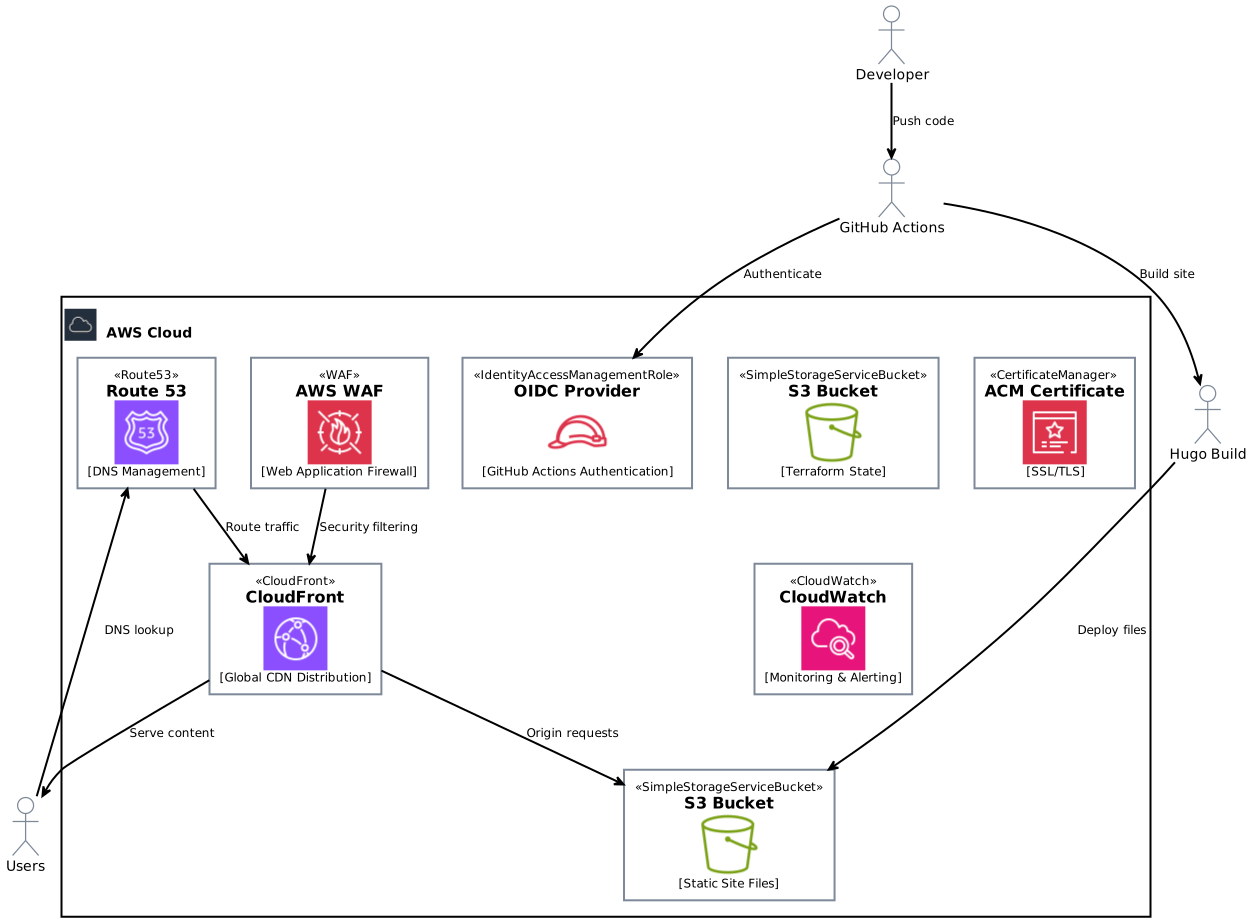
Our complete setup provides a robust, secure, and globally distributed static site hosting solution:
What You’ll Learn
This guide is structured as a progressive journey from basic automation to enterprise-grade infrastructure:
Part 1: CI/CD Pipeline with GitHub Actions
- Set up GitHub Actions for automated Hugo builds
- Configure AWS OIDC for secure, keyless authentication
- Deploy to S3 with proper IAM permissions
- Implement scheduled publishing with Hugo’s
publishDate
Part 2: Complete AWS Infrastructure
- Set up Route 53 for custom domain management
- Configure CloudFront for global content delivery
- Implement SSL/TLS with AWS Certificate Manager
- Advanced caching strategies and performance optimization
Part 3: Security with AWS WAF
- Deploy AWS WAF for web application protection
- Configure rate limiting and DDoS protection
- Implement IP allowlists/blocklists
- Set up security monitoring and alerting
Part 4: Monitoring and Operations
- CloudWatch dashboards and custom metrics
- Real User Monitoring (RUM) integration
- Automated health checks and alerting
- Performance optimization based on analytics
Key Benefits
This architecture provides:
- 🔒 Security First: OIDC authentication, WAF protection, and encrypted communications
- 🌍 Global Performance: CloudFront edge locations for worldwide content delivery
- 📊 Observability: Comprehensive monitoring and alerting
- 💰 Cost Effective: Pay-as-you-go pricing with CloudFront free tier
- 🔄 Automation: Fully automated CI/CD with infrastructure as code
- 📈 Scalable: Handles traffic spikes automatically
- 🛡️ Resilient: Multi-region redundancy and DDoS protection
Prerequisites
Before starting this guide, ensure you have:
- Hugo site in a GitHub repository
- AWS account with administrative permissions
- Domain name that you can configure DNS for
- Terraform installed locally (version >= 1.0)
- Basic knowledge of Git, YAML, and HCL syntax
Infrastructure Components
Our complete setup includes:
| Component | Purpose | Cost Impact |
|---|---|---|
| S3 Bucket | Static file storage | ~$0.02/GB/month |
| CloudFront | Global CDN | Free tier: 1TB + 10M requests |
| Route 53 | DNS management | $0.50/month + $0.40/million queries |
| ACM Certificate | SSL/TLS encryption | Free with CloudFront |
| AWS WAF | Web application firewall | $1/month + $0.60/million requests |
| CloudWatch | Monitoring & alerting | Free tier: 10 metrics |
| GitHub Actions | CI/CD pipeline | 2,000 minutes/month free |
Estimated monthly cost for a personal blog: $2-5/month depending on traffic
Security Considerations
This guide emphasizes security best practices:
- No long-lived AWS credentials in GitHub
- Principle of least privilege for IAM roles
- Encrypted data in transit and at rest
- WAF protection against common web attacks
- DDoS mitigation through CloudFront and WAF
- Regular security monitoring and alerting
Getting Started
Begin with Part 1: CI/CD Pipeline with GitHub Actions to set up your automated deployment pipeline, then progress through each part to build a complete, production-ready hosting solution.
Each part builds on the previous one, but you can also jump to specific sections if you already have some components in place.
Contributing
Found an issue or have suggestions for improvement? This guide is open to feedback and contributions. The complete source code and Terraform configurations are available in the accompanying GitHub repository.
Ready to get started? Let’s begin with setting up your CI/CD pipeline!