
James Ray
Monday, September 22, 2025
Part 4: Monitoring and Operations - Complete Hugo on AWS Guide
In this final part of our Hugo on AWS series, we’ll implement comprehensive monitoring and operational excellence practices. After building your CI/CD pipeline, infrastructure, and security layer, it’s crucial to have visibility into your site’s performance, availability, and user experience.
What We’ll Build
By the end of this guide, you’ll have:
- 📊 CloudWatch Dashboards for infrastructure and application metrics
- 🔔 Intelligent Alerting for availability and performance issues
- 👥 Real User Monitoring to understand actual user experience
- 🏥 Automated Health Checks with multi-region monitoring
- ⚡ Performance Optimization based on data-driven insights
- 💰 Cost Monitoring and budget alerts
Architecture Overview
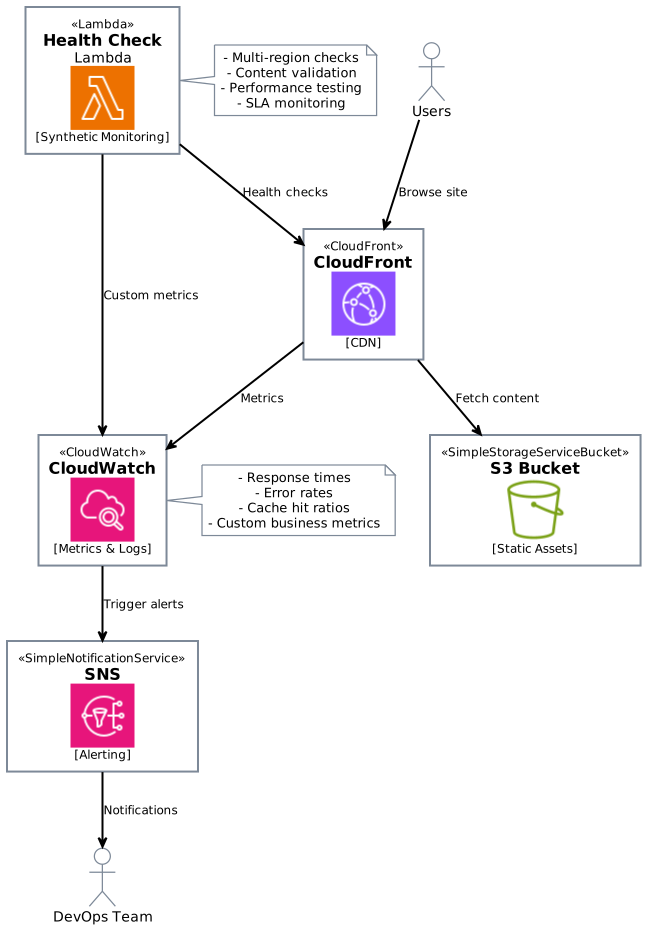
Step 1: CloudWatch Dashboards
Infrastructure Monitoring Dashboard
First, let’s create a comprehensive dashboard to monitor our infrastructure components.
 1# terraform/monitoring.tf
 2
 3resource "aws_cloudwatch_dashboard" "hugo_site" {
 4  dashboard_name = "${var.project_name}-infrastructure"
 5
 6  dashboard_body = jsonencode({
 7    widgets = [
 8      {
 9        type   = "metric"
10        x      = 0
11        y      = 0
12        width  = 12
13        height = 6
14
15        properties = {
16          metrics = [
17            ["AWS/CloudFront", "Requests", "DistributionId", aws_cloudfront_distribution.main.id],
18            [".", "BytesDownloaded", ".", "."],
19            [".", "BytesUploaded", ".", "."]
20          ]
21          view    = "timeSeries"
22          stacked = false
23          region  = var.aws_region
24          title   = "CloudFront Traffic"
25          period  = 300
26        }
27      },
28      {
29        type   = "metric"
30        x      = 12
31        y      = 0
32        width  = 12
33        height = 6
34
35        properties = {
36          metrics = [
37            ["AWS/CloudFront", "CacheHitRate", "DistributionId", aws_cloudfront_distribution.main.id],
38            [".", "OriginLatency", ".", "."]
39          ]
40          view    = "timeSeries"
41          stacked = false
42          region  = var.aws_region
43          title   = "CloudFront Performance"
44          period  = 300
45          yAxis = {
46            left = {
47              min = 0
48              max = 100
49            }
50          }
51        }
52      },
53      {
54        type   = "metric"
55        x      = 0
56        y      = 6
57        width  = 12
58        height = 6
59
60        properties = {
61          metrics = [
62            ["AWS/S3", "BucketRequests", "BucketName", aws_s3_bucket.main.bucket, "FilterId", "EntireBucket"],
63            [".", "AllRequests", ".", ".", ".", "."]
64          ]
65          view    = "timeSeries"
66          stacked = false
67          region  = var.aws_region
68          title   = "S3 Requests"
69          period  = 300
70        }
71      },
72      {
73        type   = "metric"
74        x      = 12
75        y      = 6
76        width  = 12
77        height = 6
78
79        properties = {
80          metrics = [
81            ["AWS/WAFv2", "AllowedRequests", "WebACL", aws_wafv2_web_acl.main.name, "Region", "CloudFront", "Rule", "ALL"],
82            [".", "BlockedRequests", ".", ".", ".", ".", ".", "."]
83          ]
84          view    = "timeSeries"
85          stacked = false
86          region  = "us-east-1" # WAF for CloudFront is always in us-east-1
87          title   = "WAF Activity"
88          period  = 300
89        }
90      }
91    ]
92  })
93}
Custom Metrics for Business Intelligence
Create custom metrics to track business-specific KPIs:
 1resource "aws_lambda_function" "custom_metrics" {
 2  filename         = "custom_metrics.zip"
 3  function_name    = "${var.project_name}-custom-metrics"
 4  role            = aws_iam_role.lambda_metrics.arn
 5  handler         = "index.handler"
 6  runtime         = "python3.11"
 7  timeout         = 60
 8
 9  environment {
10    variables = {
11      CLOUDFRONT_DISTRIBUTION_ID = aws_cloudfront_distribution.main.id
12      SITE_DOMAIN               = var.domain_name
13    }
14  }
15}
16
17# Schedule the function to run every 5 minutes
18resource "aws_cloudwatch_event_rule" "custom_metrics_schedule" {
19  name                = "${var.project_name}-custom-metrics"
20  description         = "Trigger custom metrics collection"
21  schedule_expression = "rate(5 minutes)"
22}
23
24resource "aws_cloudwatch_event_target" "lambda_target" {
25  rule      = aws_cloudwatch_event_rule.custom_metrics_schedule.name
26  target_id = "CustomMetricsLambdaTarget"
27  arn       = aws_lambda_function.custom_metrics.arn
28}
29
30resource "aws_lambda_permission" "allow_cloudwatch" {
31  statement_id  = "AllowExecutionFromCloudWatch"
32  action        = "lambda:InvokeFunction"
33  function_name = aws_lambda_function.custom_metrics.function_name
34  principal     = "events.amazonaws.com"
35  source_arn    = aws_cloudwatch_event_rule.custom_metrics_schedule.arn
36}
Here’s the Lambda function code for custom metrics:
 1# custom_metrics.py
 2import json
 3import boto3
 4import os
 5from datetime import datetime, timedelta
 6import requests
 7
 8def handler(event, context):
 9    cloudwatch = boto3.client('cloudwatch')
10    distribution_id = os.environ['CLOUDFRONT_DISTRIBUTION_ID']
11    domain = os.environ['SITE_DOMAIN']
12
13    # Custom metric: Site availability
14    try:
15        response = requests.get(f"https://{domain}", timeout=10)
16        availability = 1 if response.status_code == 200 else 0
17
18        cloudwatch.put_metric_data(
19            Namespace='Hugo/CustomMetrics',
20            MetricData=[
21                {
22                    'MetricName': 'SiteAvailability',
23                    'Value': availability,
24                    'Unit': 'Count',
25                    'Dimensions': [
26                        {
27                            'Name': 'Domain',
28                            'Value': domain
29                        }
30                    ]
31                }
32            ]
33        )
34
35        # Custom metric: Response time
36        response_time = response.elapsed.total_seconds() * 1000  # Convert to milliseconds
37        cloudwatch.put_metric_data(
38            Namespace='Hugo/CustomMetrics',
39            MetricData=[
40                {
41                    'MetricName': 'ResponseTime',
42                    'Value': response_time,
43                    'Unit': 'Milliseconds',
44                    'Dimensions': [
45                        {
46                            'Name': 'Domain',
47                            'Value': domain
48                        }
49                    ]
50                }
51            ]
52        )
53
54    except Exception as e:
55        print(f"Error checking site availability: {str(e)}")
56
57        # Report failure
58        cloudwatch.put_metric_data(
59            Namespace='Hugo/CustomMetrics',
60            MetricData=[
61                {
62                    'MetricName': 'SiteAvailability',
63                    'Value': 0,
64                    'Unit': 'Count',
65                    'Dimensions': [
66                        {
67                            'Name': 'Domain',
68                            'Value': domain
69                        }
70                    ]
71                }
72            ]
73        )
74
75    return {
76        'statusCode': 200,
77        'body': json.dumps('Custom metrics updated successfully')
78    }
Step 2: Intelligent Alerting
Critical Alerts
Set up alerts for critical issues that require immediate attention:
 1# SNS topic for critical alerts
 2resource "aws_sns_topic" "critical_alerts" {
 3  name = "${var.project_name}-critical-alerts"
 4}
 5
 6resource "aws_sns_topic_subscription" "email_alerts" {
 7  topic_arn = aws_sns_topic.critical_alerts.arn
 8  protocol  = "email"
 9  endpoint  = var.alert_email
10}
11
12# Site down alert
13resource "aws_cloudwatch_metric_alarm" "site_down" {
14  alarm_name          = "${var.project_name}-site-down"
15  comparison_operator = "LessThanThreshold"
16  evaluation_periods  = "2"
17  metric_name         = "SiteAvailability"
18  namespace           = "Hugo/CustomMetrics"
19  period              = "300"
20  statistic           = "Average"
21  threshold           = "1"
22  alarm_description   = "This metric monitors site availability"
23  alarm_actions       = [aws_sns_topic.critical_alerts.arn]
24  ok_actions          = [aws_sns_topic.critical_alerts.arn]
25
26  dimensions = {
27    Domain = var.domain_name
28  }
29
30  treat_missing_data = "breaching"
31}
32
33# High error rate alert
34resource "aws_cloudwatch_metric_alarm" "high_error_rate" {
35  alarm_name          = "${var.project_name}-high-error-rate"
36  comparison_operator = "GreaterThanThreshold"
37  evaluation_periods  = "2"
38  metric_name         = "4xxErrorRate"
39  namespace           = "AWS/CloudFront"
40  period              = "300"
41  statistic           = "Average"
42  threshold           = "5"  # 5% error rate
43  alarm_description   = "High 4xx error rate detected"
44  alarm_actions       = [aws_sns_topic.critical_alerts.arn]
45
46  dimensions = {
47    DistributionId = aws_cloudfront_distribution.main.id
48  }
49}
50
51# Slow response time alert
52resource "aws_cloudwatch_metric_alarm" "slow_response" {
53  alarm_name          = "${var.project_name}-slow-response"
54  comparison_operator = "GreaterThanThreshold"
55  evaluation_periods  = "3"
56  metric_name         = "ResponseTime"
57  namespace           = "Hugo/CustomMetrics"
58  period              = "300"
59  statistic           = "Average"
60  threshold           = "2000"  # 2 seconds
61  alarm_description   = "Site response time is slow"
62  alarm_actions       = [aws_sns_topic.critical_alerts.arn]
63
64  dimensions = {
65    Domain = var.domain_name
66  }
67}
Cost Monitoring
Monitor and alert on unexpected cost increases:
 1resource "aws_budgets_budget" "monthly_cost" {
 2  name         = "${var.project_name}-monthly-budget"
 3  budget_type  = "COST"
 4  limit_amount = "10"  # $10 monthly budget
 5  limit_unit   = "USD"
 6  time_unit    = "MONTHLY"
 7
 8  cost_filters = {
 9    Service = [
10      "Amazon CloudFront",
11      "Amazon Route 53",
12      "Amazon Simple Storage Service",
13      "AWS WAF"
14    ]
15  }
16
17  notification {
18    comparison_operator        = "GREATER_THAN"
19    threshold                 = 80  # Alert at 80% of budget
20    threshold_type            = "PERCENTAGE"
21    notification_type         = "ACTUAL"
22    subscriber_email_addresses = [var.alert_email]
23  }
24
25  notification {
26    comparison_operator        = "GREATER_THAN"
27    threshold                 = 100  # Alert at 100% of budget
28    threshold_type            = "PERCENTAGE"
29    notification_type          = "FORECASTED"
30    subscriber_email_addresses = [var.alert_email]
31  }
32}
Step 3: Real User Monitoring (RUM)
Implement CloudWatch RUM to understand real user experience:
 1resource "aws_rum_app_monitor" "hugo_site" {
 2  name   = "${var.project_name}-rum"
 3  domain = var.domain_name
 4
 5  app_monitor_configuration {
 6    allow_cookies = true
 7    enable_xray   = true
 8    session_sample_rate = 0.1  # Sample 10% of sessions
 9
10    telemetries = ["errors", "performance", "http"]
11  }
12
13  custom_events {
14    status = "ENABLED"
15  }
16
17  cw_log_enabled = true
18}
19
20# IAM role for RUM
21resource "aws_iam_role" "rum_role" {
22  name = "${var.project_name}-rum-role"
23
24  assume_role_policy = jsonencode({
25    Version = "2012-10-17"
26    Statement = [
27      {
28        Action = "sts:AssumeRole"
29        Effect = "Allow"
30        Principal = {
31          Service = "rum.amazonaws.com"
32        }
33      }
34    ]
35  })
36}
37
38resource "aws_iam_role_policy_attachment" "rum_policy" {
39  role       = aws_iam_role.rum_role.name
40  policy_arn = "arn:aws:iam::aws:policy/CloudWatchRUMServiceRolePolicy"
41}
Add the RUM script to your Hugo site’s head section:
 1<!-- layouts/partials/custom-head.html -->
 2<script>
 3  (function(n,i,v,r,s,c,x,z){x=window.AwsRumClient={q:[],n:n,i:i,v:v,r:r,c:c};window[n]=function(c,p){x.q.push({c:c,p:p});};z=document.createElement('script');z.async=true;z.src=s;document.head.appendChild(z);})(
 4    'cwr',
 5    '{{ .Site.Params.rum_app_id }}',
 6    '1.0.0',
 7    '{{ .Site.Params.rum_region }}',
 8    'https://client.rum.us-east-1.amazonaws.com/1.15.0/cwr.js',
 9    {
10      sessionSampleRate: 0.1,
11      identityPoolId: '{{ .Site.Params.rum_identity_pool }}',
12      endpoint: "https://dataplane.rum.{{ .Site.Params.rum_region }}.amazonaws.com",
13      telemetries: ["performance","errors","http"],
14      allowCookies: true,
15      enableXRay: true
16    }
17  );
18</script>
Configure in your Hugo config:
# config.toml
[params]
  rum_app_id = "your-rum-app-id"
  rum_region = "us-east-1"
  rum_identity_pool = "your-identity-pool-id"
Step 4: Advanced Health Checks
Multi-Region Health Monitoring
Create Lambda functions in multiple regions for comprehensive monitoring:
 1# Deploy health check Lambda in multiple regions
 2module "health_check_us_east_1" {
 3  source = "./modules/health-check"
 4
 5  region      = "us-east-1"
 6  domain_name = var.domain_name
 7  sns_topic   = aws_sns_topic.critical_alerts.arn
 8}
 9
10module "health_check_eu_west_1" {
11  source = "./modules/health-check"
12
13  region      = "eu-west-1"
14  domain_name = var.domain_name
15  sns_topic   = aws_sns_topic.critical_alerts.arn
16}
17
18module "health_check_ap_southeast_1" {
19  source = "./modules/health-check"
20
21  region      = "ap-southeast-1"
22  domain_name = var.domain_name
23  sns_topic   = aws_sns_topic.critical_alerts.arn
24}
Create the health check module:
 1# modules/health-check/main.tf
 2terraform {
 3  required_providers {
 4    aws = {
 5      source  = "hashicorp/aws"
 6      version = "~> 5.0"
 7    }
 8  }
 9}
10
11provider "aws" {
12  region = var.region
13}
14
15resource "aws_lambda_function" "health_check" {
16  filename         = "health_check.zip"
17  function_name    = "hugo-health-check-${var.region}"
18  role            = aws_iam_role.lambda_role.arn
19  handler         = "index.handler"
20  runtime         = "python3.11"
21  timeout         = 30
22
23  environment {
24    variables = {
25      DOMAIN_NAME = var.domain_name
26      REGION     = var.region
27      SNS_TOPIC  = var.sns_topic
28    }
29  }
30}
31
32# Schedule health checks every minute
33resource "aws_cloudwatch_event_rule" "health_check_schedule" {
34  name                = "hugo-health-check-${var.region}"
35  description         = "Trigger health check from ${var.region}"
36  schedule_expression = "rate(1 minute)"
37}
38
39resource "aws_cloudwatch_event_target" "lambda_target" {
40  rule      = aws_cloudwatch_event_rule.health_check_schedule.name
41  target_id = "HealthCheckLambdaTarget"
42  arn       = aws_lambda_function.health_check.arn
43}
44
45resource "aws_lambda_permission" "allow_cloudwatch" {
46  statement_id  = "AllowExecutionFromCloudWatch"
47  action        = "lambda:InvokeFunction"
48  function_name = aws_lambda_function.health_check.function_name
49  principal     = "events.amazonaws.com"
50  source_arn    = aws_cloudwatch_event_rule.health_check_schedule.arn
51}
Advanced health check function:
  1# health_check.py
  2import json
  3import boto3
  4import requests
  5import os
  6import time
  7from datetime import datetime
  8
  9def handler(event, context):
 10    cloudwatch = boto3.client('cloudwatch')
 11    sns = boto3.client('sns')
 12
 13    domain = os.environ['DOMAIN_NAME']
 14    region = os.environ['REGION']
 15    sns_topic = os.environ['SNS_TOPIC']
 16
 17    # Comprehensive health checks
 18    checks = {
 19        'availability': check_availability(domain),
 20        'performance': check_performance(domain),
 21        'content_integrity': check_content_integrity(domain),
 22        'ssl_certificate': check_ssl_certificate(domain)
 23    }
 24
 25    # Publish metrics
 26    for check_name, result in checks.items():
 27        cloudwatch.put_metric_data(
 28            Namespace='Hugo/HealthCheck',
 29            MetricData=[
 30                {
 31                    'MetricName': f'{check_name}_status',
 32                    'Value': 1 if result['success'] else 0,
 33                    'Unit': 'Count',
 34                    'Dimensions': [
 35                        {'Name': 'Domain', 'Value': domain},
 36                        {'Name': 'Region', 'Value': region}
 37                    ]
 38                }
 39            ]
 40        )
 41
 42        if 'response_time' in result:
 43            cloudwatch.put_metric_data(
 44                Namespace='Hugo/HealthCheck',
 45                MetricData=[
 46                    {
 47                        'MetricName': f'{check_name}_response_time',
 48                        'Value': result['response_time'],
 49                        'Unit': 'Milliseconds',
 50                        'Dimensions': [
 51                            {'Name': 'Domain', 'Value': domain},
 52                            {'Name': 'Region', 'Value': region}
 53                        ]
 54                    }
 55                ]
 56            )
 57
 58    # Alert on failures
 59    failed_checks = [name for name, result in checks.items() if not result['success']]
 60    if failed_checks:
 61        message = f"Health check failures from {region}:\n"
 62        for check in failed_checks:
 63            message += f"- {check}: {checks[check]['error']}\n"
 64
 65        sns.publish(
 66            TopicArn=sns_topic,
 67            Subject=f"Hugo Site Health Check Failure - {region}",
 68            Message=message
 69        )
 70
 71    return {
 72        'statusCode': 200,
 73        'body': json.dumps({
 74            'region': region,
 75            'checks': checks,
 76            'timestamp': datetime.utcnow().isoformat()
 77        })
 78    }
 79
 80def check_availability(domain):
 81    try:
 82        start_time = time.time()
 83        response = requests.get(f"https://{domain}", timeout=10)
 84        response_time = (time.time() - start_time) * 1000
 85
 86        return {
 87            'success': response.status_code == 200,
 88            'response_time': response_time,
 89            'status_code': response.status_code
 90        }
 91    except Exception as e:
 92        return {
 93            'success': False,
 94            'error': str(e)
 95        }
 96
 97def check_performance(domain):
 98    try:
 99        start_time = time.time()
100        response = requests.get(f"https://{domain}", timeout=10)
101        response_time = (time.time() - start_time) * 1000
102
103        # Check if response time is acceptable (< 2 seconds)
104        performance_ok = response_time < 2000
105
106        return {
107            'success': performance_ok,
108            'response_time': response_time,
109            'threshold': 2000
110        }
111    except Exception as e:
112        return {
113            'success': False,
114            'error': str(e)
115        }
116
117def check_content_integrity(domain):
118    try:
119        response = requests.get(f"https://{domain}", timeout=10)
120
121        # Check for expected content
122        expected_elements = ['<title>', '<head>', '<body>']
123        content_ok = all(element in response.text for element in expected_elements)
124
125        return {
126            'success': content_ok and response.status_code == 200,
127            'content_length': len(response.text)
128        }
129    except Exception as e:
130        return {
131            'success': False,
132            'error': str(e)
133        }
134
135def check_ssl_certificate(domain):
136    try:
137        import ssl
138        import socket
139        from datetime import datetime
140
141        # Get SSL certificate info
142        context = ssl.create_default_context()
143        with socket.create_connection((domain, 443), timeout=10) as sock:
144            with context.wrap_socket(sock, server_hostname=domain) as ssock:
145                cert = ssock.getpeercert()
146
147                # Check if certificate is valid and not expiring soon
148                expiry_date = datetime.strptime(cert['notAfter'], '%b %d %H:%M:%S %Y %Z')
149                days_until_expiry = (expiry_date - datetime.utcnow()).days
150
151                return {
152                    'success': days_until_expiry > 7,  # Alert if expiring within 7 days
153                    'days_until_expiry': days_until_expiry,
154                    'issuer': cert.get('issuer', [])
155                }
156    except Exception as e:
157        return {
158            'success': False,
159            'error': str(e)
160        }
Step 5: Performance Optimization Dashboard
Create a dedicated performance dashboard:
 1resource "aws_cloudwatch_dashboard" "performance" {
 2  dashboard_name = "${var.project_name}-performance"
 3
 4  dashboard_body = jsonencode({
 5    widgets = [
 6      {
 7        type   = "metric"
 8        x      = 0
 9        y      = 0
10        width  = 24
11        height = 6
12
13        properties = {
14          metrics = [
15            ["Hugo/HealthCheck", "availability_response_time", "Region", "us-east-1"],
16            [".", ".", ".", "eu-west-1"],
17            [".", ".", ".", "ap-southeast-1"]
18          ]
19          view    = "timeSeries"
20          stacked = false
21          region  = var.aws_region
22          title   = "Global Response Times"
23          period  = 300
24          yAxis = {
25            left = {
26              min = 0
27            }
28          }
29        }
30      },
31      {
32        type   = "metric"
33        x      = 0
34        y      = 6
35        width  = 12
36        height = 6
37
38        properties = {
39          metrics = [
40            ["AWS/CloudFront", "CacheHitRate", "DistributionId", aws_cloudfront_distribution.main.id]
41          ]
42          view    = "timeSeries"
43          stacked = false
44          region  = var.aws_region
45          title   = "Cache Hit Rate"
46          period  = 300
47          yAxis = {
48            left = {
49              min = 0
50              max = 100
51            }
52          }
53        }
54      },
55      {
56        type   = "metric"
57        x      = 12
58        y      = 6
59        width  = 12
60        height = 6
61
62        properties = {
63          metrics = [
64            ["AWS/CloudFrontRealTimeMetrics", "101-200", "DistributionId", aws_cloudfront_distribution.main.id],
65            [".", "201-300", ".", "."],
66            [".", "301-400", ".", "."],
67            [".", "401-500", ".", "."],
68            [".", "501-600", ".", "."]
69          ]
70          view    = "timeSeries"
71          stacked = true
72          region  = var.aws_region
73          title   = "HTTP Status Code Distribution"
74          period  = 60
75        }
76      }
77    ]
78  })
79}
Step 6: Deployment and Testing
Update your terraform variables:
 1# variables.tf additions
 2variable "alert_email" {
 3  description = "Email address for receiving alerts"
 4  type        = string
 5}
 6
 7variable "rum_enabled" {
 8  description = "Enable Real User Monitoring"
 9  type        = bool
10  default     = true
11}
Deploy the monitoring infrastructure:
# Add monitoring configuration
terraform plan -var="alert_email=your-email@example.com"
terraform apply -var="alert_email=your-email@example.com"

# Package and deploy Lambda functions
cd terraform
zip custom_metrics.zip custom_metrics.py
zip health_check.zip health_check.py

# Update Lambda functions
aws lambda update-function-code \
  --function-name hugo-custom-metrics \
  --zip-file fileb://custom_metrics.zip

aws lambda update-function-code \
  --function-name hugo-health-check-us-east-1 \
  --zip-file fileb://health_check.zip
Step 7: Creating Operational Runbooks
Incident Response Playbook
Create documentation for common scenarios:
# Hugo Site Incident Response Playbook

## Site Down Alert

### Immediate Actions (< 5 minutes)
1. Check CloudWatch dashboard for error patterns
2. Verify DNS resolution: `nslookup yourdomain.com`
3. Check CloudFront distribution status
4. Review recent deployments in GitHub Actions

### Investigation Steps
1. Check S3 bucket accessibility
2. Review WAF logs for blocked requests
3. Examine Lambda function logs
4. Verify SSL certificate status

### Resolution Steps
1. If S3 issue: Check bucket policies and CORS
2. If CloudFront issue: Create invalidation for affected paths
3. If DNS issue: Verify Route 53 configuration
4. If code issue: Rollback via GitHub Actions

## Performance Degradation

### Investigation
1. Check cache hit ratio trends
2. Review origin latency metrics
3. Examine user location distribution
4. Analyze content size and compression

### Optimization Actions
1. Enable additional compression in CloudFront
2. Review and optimize image sizes
3. Implement additional caching headers
4. Consider adding more edge locations
Monitoring Checklist
✅ Infrastructure Monitoring
- CloudFront metrics and alarms
- S3 request monitoring
- WAF activity tracking
- DNS query monitoring
✅ Application Monitoring
- Site availability checks
- Performance monitoring
- Content integrity validation
- SSL certificate monitoring
✅ User Experience Monitoring
- Real User Monitoring (RUM) setup
- Core Web Vitals tracking
- Error rate monitoring
- Geographic performance analysis
✅ Operational Excellence
- Automated alerting configured
- Incident response procedures documented
- Cost monitoring and budgets set
- Regular review processes established
Next Steps
With comprehensive monitoring in place, consider these advanced optimizations:
- A/B Testing Setup: Implement CloudFront behaviors for testing different content versions
- Advanced Analytics: Integrate with Google Analytics or Adobe Analytics for deeper insights
- Automated Scaling: Set up auto-scaling for increased traffic periods
- Disaster Recovery: Implement multi-region failover capabilities
Conclusion
You now have a production-grade monitoring and operations setup for your Hugo site on AWS. This monitoring system provides:
- Proactive alerting to catch issues before users do
- Performance insights to guide optimization efforts
- Cost visibility to prevent budget surprises
- Operational excellence through automated monitoring and alerting
Your Hugo site is now equipped with enterprise-grade monitoring that will scale with your needs and provide the visibility required for reliable operations.
Series Navigation
📚 Complete Hugo on AWS Guide
- Overview & Setup
- Part 1: GitHub Actions CI/CD
- Part 2: AWS Infrastructure
- Part 3: AWS WAF Security
- Part 4: Monitoring & Operations ← You are here
Ready to implement monitoring for your Hugo site? Start with the CloudWatch dashboards and gradually add the advanced monitoring features as needed.