
James Ray
Sunday, August 10, 2025
Building a Local PlantUML Extension for Hugo: No External Dependencies Required
When writing technical documentation, diagrams are essential for explaining complex architectures and workflows. PlantUML is a fantastic tool for creating diagrams from simple text descriptions, but most Hugo implementations rely on external web services or require manual diagram generation. Today, I’ll show you how to build a complete Hugo extension that processes PlantUML diagrams locally using Hugo shortcodes—no external dependencies, no source file modifications, just seamless integration.
Why Build a Local PlantUML Extension?
Most Hugo PlantUML solutions have significant limitations:
- External web services: Slow, unreliable, and expose your diagram content to third parties
- Manual processing: Time-consuming and error-prone workflow
- No caching: Regenerates unchanged diagrams on every build
- Source file pollution: HTML comments or modifications in your markdown
Our solution addresses all these pain points:
✅ Completely local processing using PlantUML JAR file
✅ Hugo shortcode integration with pre-generated SVGs
✅ Smart caching based on content hashing
✅ Source files untouched - clean markdown with Hugo shortcodes
✅ Professional styling with responsive SVG rendering
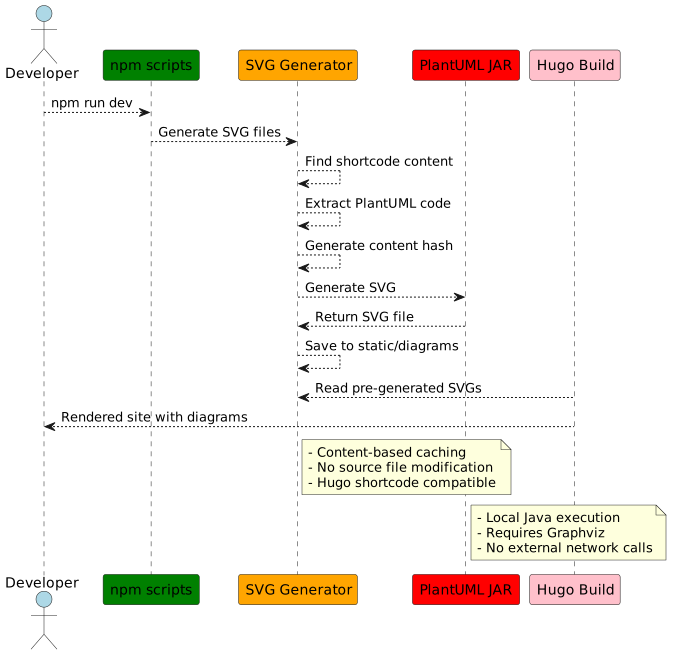
Architecture Overview
Here’s how our PlantUML extension works:
Prerequisites
Before we start, make sure you have:
- Node.js (for npm scripts and file processing)
- Java Runtime Environment (to run PlantUML JAR)
- Graphviz (required by PlantUML for certain diagram types)
- A Hugo site with module support
Step 1: Project Structure Setup
First, let’s create the directory structure for our extension:
1# Create the bin directory for our scripts
2mkdir -p bin
3
4# Create static directory for generated SVGs
5mkdir -p static/diagrams
6
7# Create layouts directory for Hugo shortcode
8mkdir -p layouts/shortcodes
Step 2: Download and Setup PlantUML
Create a setup script that handles the initial environment configuration:
  1#!/usr/bin/env node
  2
  3const fs = require('fs');
  4const path = require('path');
  5const { execSync } = require('child_process');
  6
  7const PLANTUML_JAR = path.join(__dirname, 'plantuml.jar');
  8const STATIC_DIAGRAMS_DIR = path.join(process.cwd(), 'static', 'diagrams');
  9const TEMP_DIR = path.join(process.cwd(), 'temp', 'plantuml');
 10
 11async function setupPlantUML() {
 12  console.log('🚀 Setting up PlantUML environment...');
 13
 14  // Create necessary directories
 15  [STATIC_DIAGRAMS_DIR, TEMP_DIR].forEach(dir => {
 16    if (!fs.existsSync(dir)) {
 17      fs.mkdirSync(dir, { recursive: true });
 18      console.log(`✓ Created directory: ${path.relative(process.cwd(), dir)}`);
 19    }
 20  });
 21
 22  // Download PlantUML JAR if it doesn't exist
 23  if (!fs.existsSync(PLANTUML_JAR)) {
 24    console.log('📦 Downloading PlantUML JAR...');
 25    try {
 26      execSync(`curl -L -o "${PLANTUML_JAR}" "https://github.com/plantuml/plantuml/releases/latest/download/plantuml.jar"`,
 27        { stdio: 'inherit' });
 28      console.log('✓ PlantUML JAR downloaded successfully');
 29    } catch (error) {
 30      console.error('❌ Failed to download PlantUML JAR:', error.message);
 31      console.log('You can manually download it from: https://github.com/plantuml/plantuml/releases/latest');
 32      process.exit(1);
 33    }
 34  } else {
 35    console.log('✓ PlantUML JAR already exists');
 36  }
 37
 38  // Check Java installation
 39  try {
 40    const javaVersion = execSync('java -version 2>&1', { encoding: 'utf-8' });
 41    console.log('✓ Java is installed:', javaVersion.split('\n')[0]);
 42  } catch (error) {
 43    console.error('❌ Java is not installed or not in PATH');
 44    console.log('Please install Java to use PlantUML');
 45    process.exit(1);
 46  }
 47
 48  // Check Graphviz installation
 49  try {
 50    const dotVersion = execSync('dot -V 2>&1', { encoding: 'utf-8' });
 51    console.log('✓ Graphviz is installed:', dotVersion.trim());
 52  } catch (error) {
 53    console.warn('⚠️  Graphviz is not installed. Some PlantUML diagrams may not work properly.');
 54    console.log('To install Graphviz:');
 55    console.log('  Ubuntu/Debian: sudo apt install graphviz');
 56    console.log('  macOS: brew install graphviz');
 57    console.log('  Windows: Download from https://graphviz.org/download/');
 58  }
 59
 60  // Test PlantUML with Graphviz
 61  try {
 62    execSync(`java -jar "${PLANTUML_JAR}" -testdot`, { stdio: 'pipe' });
 63    console.log('✓ PlantUML + Graphviz integration working');
 64  } catch (error) {
 65    console.warn('⚠️  PlantUML may have issues with Graphviz integration');
 66  }
 67
 68  // Create gitignore entries
 69  const gitignorePath = path.join(process.cwd(), '.gitignore');
 70  const gitignoreEntries = [
 71    '# PlantUML temp files',
 72    'temp/plantuml/',
 73    '# PlantUML JAR (downloaded automatically)',
 74    'bin/plantuml.jar'
 75  ].join('\n');
 76
 77  if (fs.existsSync(gitignorePath)) {
 78    const gitignoreContent = fs.readFileSync(gitignorePath, 'utf-8');
 79    if (!gitignoreContent.includes('temp/plantuml/')) {
 80      fs.appendFileSync(gitignorePath, '\n' + gitignoreEntries + '\n');
 81      console.log('✓ Updated .gitignore with PlantUML entries');
 82    }
 83  } else {
 84    fs.writeFileSync(gitignorePath, gitignoreEntries + '\n');
 85    console.log('✓ Created .gitignore with PlantUML entries');
 86  }
 87
 88  console.log('✅ PlantUML setup complete!');
 89  console.log('');
 90  console.log('Usage:');
 91  console.log('  npm run plantuml:process  - Process PlantUML diagrams');
 92  console.log('  npm run dev              - Start development server with PlantUML processing');
 93  console.log('  npm run build            - Build site with PlantUML processing');
 94}
 95
 96if (require.main === module) {
 97  setupPlantUML();
 98}
 99
100module.exports = { setupPlantUML };
Step 3: The SVG Generation Script
Now, let’s create the script that generates SVG files from Hugo shortcode content:
  1#!/usr/bin/env node
  2
  3const fs = require('fs');
  4const path = require('path');
  5const { execSync } = require('child_process');
  6const crypto = require('crypto');
  7
  8// Configuration
  9const PLANTUML_JAR = path.join(__dirname, 'plantuml.jar');
 10const CONTENT_DIR = path.join(process.cwd(), 'content');
 11const STATIC_DIR = path.join(process.cwd(), 'static', 'diagrams');
 12const TEMP_DIR = path.join(process.cwd(), 'temp', 'plantuml');
 13
 14// Ensure directories exist
 15[STATIC_DIR, TEMP_DIR].forEach(dir => {
 16  if (!fs.existsSync(dir)) {
 17    fs.mkdirSync(dir, { recursive: true });
 18  }
 19});
 20
 21// Check if PlantUML JAR exists
 22function ensurePlantUMLJar() {
 23  if (!fs.existsSync(PLANTUML_JAR)) {
 24    console.log('❌ PlantUML JAR not found. Run: npm run plantuml:setup');
 25    process.exit(1);
 26  }
 27}
 28
 29// Generate hash for PlantUML content (matching Hugo's processing)
 30function getContentHash(content) {
 31  let processed = content.trim();
 32
 33  return crypto.createHash('sha256').update(processed).digest('hex').substring(0, 8);
 34}
 35
 36// Extract PlantUML blocks from markdown content within shortcodes
 37function extractPlantUMLShortcodes(content) {
 38  const blocks = [];
 39  // Match both {{< plantuml >}} and {{< plantuml alt="..." >}} formats
 40  const regex = /\{\{<\s*plantuml[^>]*>\}\}([\s\S]*?)\{\{<\s*\/plantuml\s*>\}\}/g;
 41  let match;
 42
 43  while ((match = regex.exec(content)) !== null) {
 44    const plantUMLContent = match[1];
 45    // Remove markdown code block wrapper if present, but keep other formatting
 46    const cleanContent = plantUMLContent.replace(/^```plantuml\s*\n/, '').replace(/\n```$/, '');
 47
 48    blocks.push({
 49      fullMatch: match[0],
 50      content: cleanContent, // Don't trim here - let getContentHash handle it consistently
 51      index: match.index
 52    });
 53  }
 54
 55  return blocks;
 56}
 57
 58// Process a single PlantUML block and generate SVG
 59function processPlantUMLBlock(block, filePath, blockIndex) {
 60  const hash = getContentHash(block.content);
 61  const fileName = path.basename(filePath, '.md');
 62  const outputName = `${fileName}-${hash}.svg`;
 63  const outputPath = path.join(STATIC_DIR, outputName);
 64
 65  // Skip if already generated
 66  if (fs.existsSync(outputPath)) {
 67    return `/diagrams/${outputName}`;
 68  }
 69
 70  try {
 71    const tempFile = path.join(TEMP_DIR, `${hash}.puml`);
 72    const tempOutputDir = path.join(TEMP_DIR, 'output');
 73
 74    // Ensure temp output directory exists
 75    if (!fs.existsSync(tempOutputDir)) {
 76      fs.mkdirSync(tempOutputDir, { recursive: true });
 77    }
 78
 79    // Write PlantUML content to temp file
 80    fs.writeFileSync(tempFile, block.content);
 81
 82    // Generate SVG using PlantUML JAR
 83    execSync(`java -jar "${PLANTUML_JAR}" -tsvg -o "${tempOutputDir}" "${tempFile}"`,
 84      { stdio: 'pipe' });
 85
 86    // Find generated SVG (PlantUML may use diagram title as filename)
 87    const generatedFiles = fs.readdirSync(tempOutputDir).filter(f => f.endsWith('.svg'));
 88
 89    if (generatedFiles.length > 0) {
 90      const generatedFile = path.join(tempOutputDir, generatedFiles[0]);
 91      fs.renameSync(generatedFile, outputPath);
 92      console.log(`✓ Generated: ${outputName}`);
 93
 94      // Clean up temp files
 95      fs.unlinkSync(tempFile);
 96      generatedFiles.forEach(f => {
 97        const tempGenFile = path.join(tempOutputDir, f);
 98        if (fs.existsSync(tempGenFile)) {
 99          fs.unlinkSync(tempGenFile);
100        }
101      });
102    }
103
104    return `/diagrams/${outputName}`;
105
106  } catch (error) {
107    console.error(`❌ Failed to process PlantUML in ${filePath}:`, error.message);
108    return null;
109  }
110}
111
112// Process all markdown files and generate SVGs (without modifying source)
113function generateSVGsOnly() {
114  const markdownFiles = [];
115
116  function findMarkdownFiles(dir) {
117    const items = fs.readdirSync(dir);
118
119    for (const item of items) {
120      const itemPath = path.join(dir, item);
121      const stat = fs.statSync(itemPath);
122
123      if (stat.isDirectory()) {
124        findMarkdownFiles(itemPath);
125      } else if (item.endsWith('.md')) {
126        markdownFiles.push(itemPath);
127      }
128    }
129  }
130
131  findMarkdownFiles(CONTENT_DIR);
132
133  let generatedCount = 0;
134
135  for (const filePath of markdownFiles) {
136    const content = fs.readFileSync(filePath, 'utf-8');
137    const blocks = extractPlantUMLShortcodes(content);
138
139    if (blocks.length === 0) continue;
140
141    console.log(`📄 Processing ${path.relative(process.cwd(), filePath)}`);
142
143    blocks.forEach((block, index) => {
144      const svgPath = processPlantUMLBlock(block, filePath, index);
145      if (svgPath) {
146        generatedCount++;
147      }
148    });
149  }
150
151  console.log(`✅ Generated ${generatedCount} SVG diagrams`);
152}
153
154// Main execution
155function main() {
156  console.log('🎨 Generating PlantUML SVGs (source files unchanged)...');
157
158  ensurePlantUMLJar();
159  generateSVGsOnly();
160
161  console.log('✅ SVG generation complete!');
162}
163
164if (require.main === module) {
165  main();
166}
167
168module.exports = { generateSVGsOnly };
Step 4: Hugo Shortcode for Rendering
Create a Hugo shortcode that renders the pre-generated SVG files:
 1{{- $content := .Inner -}}
 2{{- $trimmed := $content | strings.TrimSpace -}}
 3{{- $hash := ($trimmed | sha256 | truncate 8 "") -}}
 4{{- $filename := printf "%s-%s.svg" (.Page.File.BaseFileName | default "diagram") $hash -}}
 5{{- $svgPath := printf "/diagrams/%s" $filename -}}
 6
 7<div class="plantuml-diagram">
 8  <img
 9    src="{{ $svgPath }}"
10    alt="{{ .Get "alt" | default "PlantUML Diagram" }}"
11    loading="lazy"
12  />
13</div>
This shortcode:
- Calculates the same hash as the generation script
- Constructs the SVG file path using the page name and content hash
- Renders a responsive image with professional styling
- Never modifies your source markdown files
Step 5: npm Scripts Integration
Add these scripts to your package.json:
{
  "scripts": {
    "dev": "npm run plantuml:generate && hugo server --buildFuture --buildDrafts --disableFastRender",
    "dev:future": "npm run plantuml:generate && hugo server --buildFuture",
    "build": "npm run plantuml:generate && hugo --minify",
    "build:future": "npm run plantuml:generate && hugo --buildFuture --minify",
    "plantuml:generate": "node bin/generate-plantuml-svgs.js",
    "plantuml:setup": "node bin/setup-plantuml.js"
  }
}
Step 6: Hugo Configuration
Add the diagrams directory to your Hugo module mounts in config.toml:
86[[module.mounts]]
87source = "static/diagrams"
88target = "static/diagrams"
This ensures Hugo properly serves the generated SVG files.
Step 7: Git Configuration
Add these entries to your .gitignore:
1# PlantUML temp files
2temp/*
3
4# PlantUML JAR (downloaded automatically)
5bin/plantuml.jar
The generated SVG files in static/diagrams/ should be committed to version control alongside your content.
Usage Workflow
Initial Setup
This will:
- Download PlantUML JAR
- Create necessary directories
- Verify Java and Graphviz installation
- Test PlantUML integration
1# Install dependencies
2npm run plantuml:setup
Development Workflow
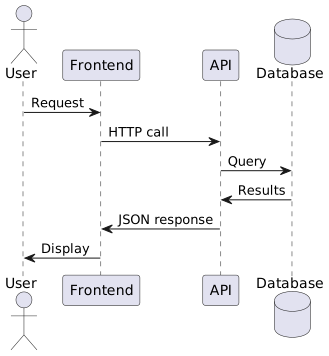
- Write PlantUML in your markdown files using Hugo shortcodes:
{{<plantuml alt="System Architecture Diagram">}}
@startuml System Architecture

actor User
participant Frontend
participant API
database Database

User -> Frontend: Request
Frontend -> API: HTTP call
API -> Database: Query
Database -> API: Results
API -> Frontend: JSON response
Frontend -> User: Display

@enduml
{{</plantuml>}}

The diagram shows...
And here’s the actual rendered diagram:
- Generate SVG files:
npm run plantuml:generate
The script will:
- Find all Hugo shortcodes containing PlantUML content
- Generate SVG files with content-based hashing
- Save files to
static/diagrams/directory - Leave your source markdown files completely untouched
- Start development server:
npm run dev # Generates SVGs + starts Hugo server
- Your shortcode renders the pre-generated SVG:
The Hugo shortcode automatically:
- Calculates the same hash from the PlantUML content
- References the correct SVG file:
/diagrams/filename-hash.svg - Renders a responsive, styled diagram
Advanced Features
Content-based caching: Only regenerates diagrams when PlantUML source changes
Hugo-native rendering: Uses pure Hugo shortcodes with no source file modifications
Multiple diagrams per file: Each gets a unique hash based on content
filename-abc123de.svgfilename-xyz789fg.svg- etc.
Responsive styling: SVG diagrams scale properly on all device sizes
Benefits of This Approach
🚀 Performance
- Local processing is faster than external services
- Smart caching prevents unnecessary regeneration
- SVG files are served directly by Hugo
🔒 Security & Privacy
- No external network calls during build
- Diagram content never leaves your environment
- Works completely offline
🛠 Developer Experience
- Clean Hugo shortcode integration
- Preview diagrams instantly during development
- No backup/restore complexity - source files stay clean
- Content-based hashing prevents unnecessary rebuilds
📦 Maintainability
- Version control for both source and generated SVGs
- Reproducible builds across environments
- Hugo shortcodes keep content semantic and clean
- No file modification or temporary backup complexity
Troubleshooting
Common Issues
“Java not found”: Install Java JRE/JDK
1# Ubuntu/Debian
2sudo apt install default-jre
3
4# macOS
5brew install openjdk
“Graphviz not found”: Install Graphviz for full diagram support
1# Ubuntu/Debian
2sudo apt install graphviz
3
4# macOS
5brew install graphviz
“PlantUML syntax error”: Check your PlantUML syntax at plantuml.com
Debugging
Enable verbose output by modifying the generation script to include { stdio: 'inherit' } in the execSync calls.
Hash Mismatch Issues
If diagrams don’t load, ensure the generation script and Hugo shortcode are calculating the same hash:
- Check that both use the same trimming behavior
- Verify the content between shortcode tags matches exactly
- Regenerate SVGs:
npm run plantuml:generate
Extending the System
Custom Styling
Modify the Hugo shortcode to add custom CSS classes or styling:
<!-- layouts/shortcodes/plantuml.html -->
{{< $content := .Inner | trim " \n\r\t" >}}
{{< $hash := ($content | sha256 | truncate 8 "") >}}
{{< $filename := printf "%s-%s.svg" (.Page.File.BaseFileName | default "diagram") $hash >}}
{{< $svgPath := printf "/diagrams/%s" $filename >}}

<div class="plantuml {{/* .Get "class" | default "" */}}">
  <figure>
    <img
      src="{{/* $svgPath */}}"
      alt="{{/* .Get "alt" | default "PlantUML Diagram" */}}"
      style="max-width: 100%; height: auto;"
    />
    {{/* with .Get "caption" */}}
    <figcaption>{{/* . */}}</figcaption>
    {{/* end */}}
  </figure>
</div>
Then use it with:
1{{< plantuml alt="My Diagram" caption="System Architecture Overview" class="centered" >}}
2@startuml
3...
4@enduml
5{{< /plantuml >}}
Multiple Output Formats
Extend the generation script to create multiple formats:
1// Generate both SVG and PNG
2execSync(`java -jar "${PLANTUML_JAR}" -tsvg -tpng -o "${tempOutputDir}" "${tempFile}"`);
Different Diagram Types
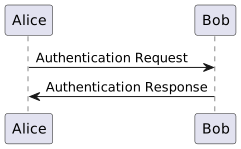
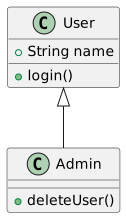
The shortcode approach works with all PlantUML diagram types:
 1{{< plantuml alt="Sequence Diagram" >}}
 2@startuml
 3Alice -> Bob: Authentication Request
 4Bob -> Alice: Authentication Response
 5@enduml
 6{{< /plantuml >}}
 7
 8{{< plantuml alt="Class Diagram" >}}
 9@startuml
10class User {
11  +String name
12  +login()
13}
14class Admin extends User {
15  +deleteUser()
16}
17@enduml
18{{< /plantuml >}}
CI/CD Integration
The extension works seamlessly in CI/CD environments. Just ensure Java and Graphviz are available in your build container.
Conclusion
This Hugo PlantUML extension provides a robust, local solution for diagram generation that integrates seamlessly with Hugo’s native shortcode system. By using a two-phase approach—SVG generation followed by Hugo rendering—you get the best of both worlds: local processing with clean, untouched source files.
The content-based caching system ensures efficient rebuilds, while the Hugo shortcode approach maintains semantic, readable markdown without any file modifications or backup complexity.
Key advantages of this approach:
✅ Clean source files: No HTML comments or modifications in your markdown
✅ Hugo-native: Uses standard shortcode syntax that Hugo developers expect
✅ Efficient caching: Only regenerates changed diagrams
✅ Local processing: No external dependencies or network calls
✅ Professional rendering: Responsive, styled diagrams that integrate with your theme
Happy diagramming! 🎨